
F1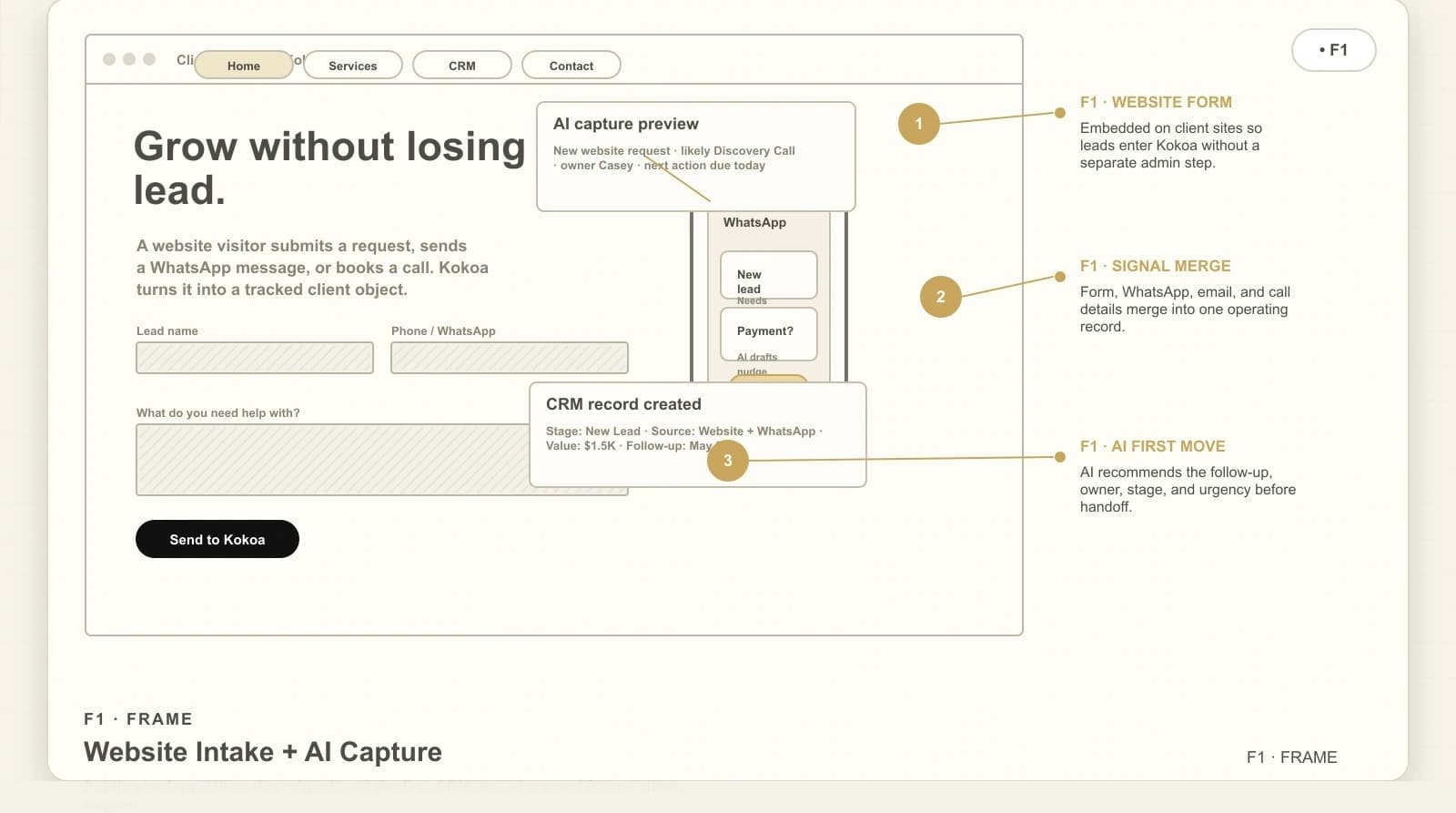
F1· Frame
Website Intake + AI Capture
Website-attached intake turns a visitor into a tracked CRM record with a recommended first action.

Introducing Orbyte, a full platform built to help businesses scale and launch custom AI automations.
AI CRM Product Design Case Study
Designing a client-attached CRM layer that turns leads, messages, calls, payments, scheduling, and operator approvals into one guided workflow.
Kokoa was built as an AI operating system for service businesses that need more than a website form. The platform connects the client's website, CRM, WhatsApp, email, calling, payments, and calendar surfaces so operators know what changed, what needs review, and what action should happen next.
Role
Product Designer / Founder
Focus
AI CRM, operations UX, automation, payments, scheduling
Pilot context
SetVision CRM operating system
System
Website-attached CRM, WhatsApp, email, calls, tasks, calendar, payments
Status
Built product direction / live CRM build
Platform preview
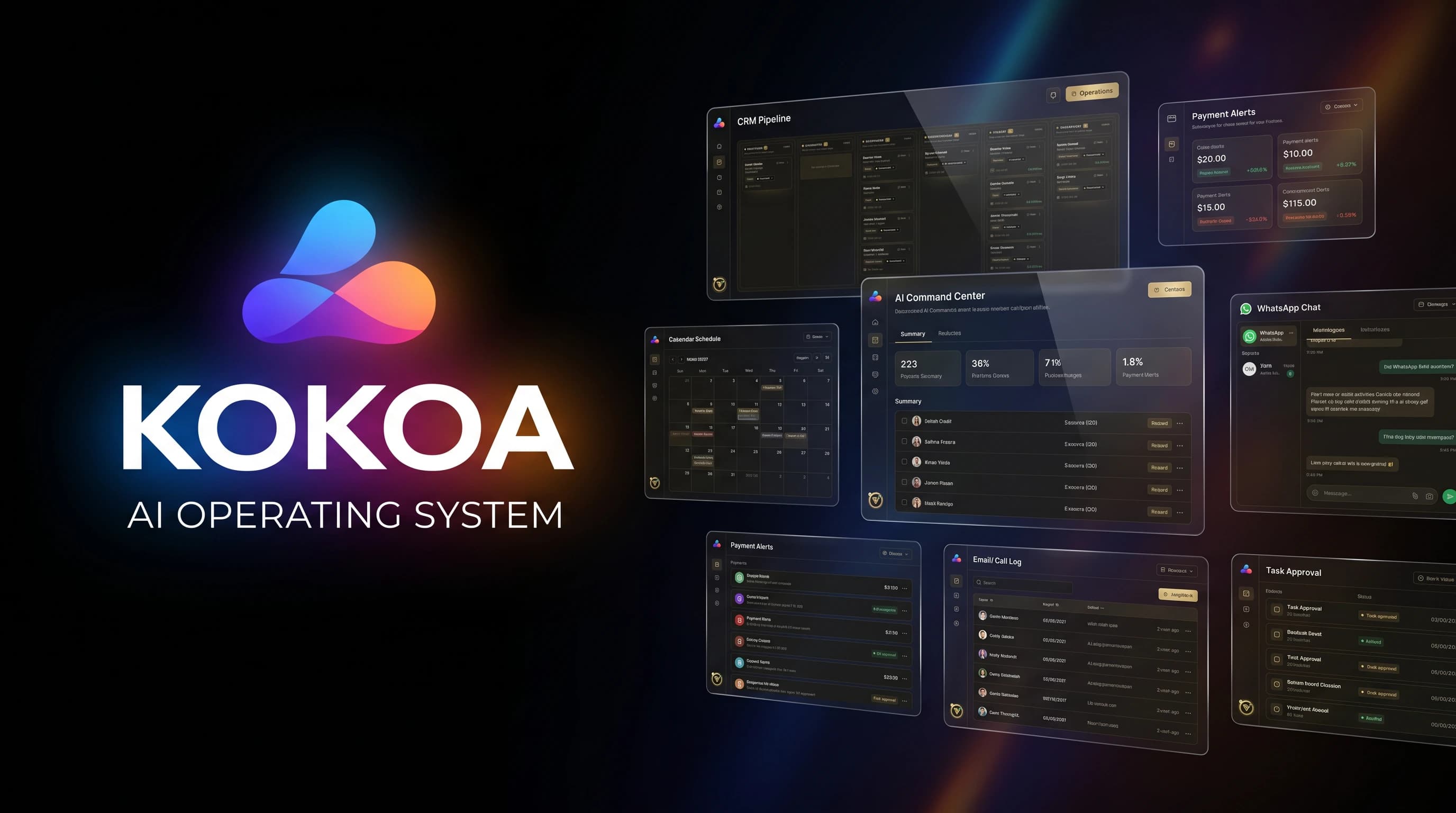
Why this project matters
The goal was not to design another CRM dashboard. The goal was to design the layer between the business and its clients: a system that understands where every relationship stands, recommends the next move, and keeps high-risk actions under operator control.
Leads, tasks, texts, emails, payments, calls, and calendar events often live in separate tools. Operators waste time finding context before doing the work.
AI can draft and organize, but client-facing actions still need clarity, consent, and human approval when money or relationships are involved.
A growing service business needs a repeatable way to move every prospect from first touch to signed client, onboarding, payment, and follow-up.
User and use case
Primary users
Design principle
The system should let AI prepare the work, but let the operator own the decision.
Kokoa treats automation as an operating layer, not an autopilot. It can scan CRM records, payments, tasks, email risk, calendar gaps, and client status, then route the work into approvals, next-best actions, or clear dashboards.
The core workflow
Kokoa is organized around a loop: capture the client signal, connect it to the CRM, let AI prepare the next move, keep the operator in control, and sync the work back to scheduling, payments, and reporting.
Leads enter from the website, CRM forms, WhatsApp, email, phone calls, or operator-created tasks.
The system links every record to stage, owner, school/team, follow-up date, value, and next action.
AI scans the daily operating picture and prepares follow-ups, summaries, payment nudges, and risk flags.
Sensitive moves like financial changes, client messages, and escalations are queued for human review.
Meetings, CEO calls, discovery calls, and onboarding steps connect back to client records.
MRR, receivables, missed payments, and collections become visible in the same command surface.
Wireframe story
Drag through the twelve annotated wireframe frames that defined the operating flow: intake · AI brief · pipeline · client record · messaging · calendar · payments · task board · team KPIs · coverage · automation health.
F1· Frame
Website-attached intake turns a visitor into a tracked CRM record with a recommended first action.

F2· Frame
The founder starts with what changed, what needs approval, and which actions move the day forward.

F3· Frame
The list view supports filtering, ownership, follow-up timing, potential value, and fast profile opening.

F4· Frame
The board explains the sales motion visually and makes stalled work visible without opening reports.

F5· Frame
Operators can move from context to action without hunting through WhatsApp, email, calendars, or payment tools.

F6· Frame
Messaging work stays attached to client records while protecting the operator from unsafe automation.

F7· Frame
Calendar is not just scheduling; it is a way to keep client movement visible and accountable.

F8· Frame
Payment intelligence sits beside client status, so revenue risk becomes operating work instead of a separate report.

F9· Frame
Daily work becomes movable, visible, and tied to the client it affects.

F10· Frame
The manager can see who is moving leads, who is blocked, and what needs escalation.

F11· Frame
Coverage views help a team see what has been cleared, what is partial, and who owns follow-up.

F12· Frame
The product makes automation visible, measurable, and interruptible instead of mysterious.
Final product experience
The final direction uses a dark, focused interface with warm operational accents. Every surface has a clear job: show the status, expose risk, move the client forward, or prepare work for approval.
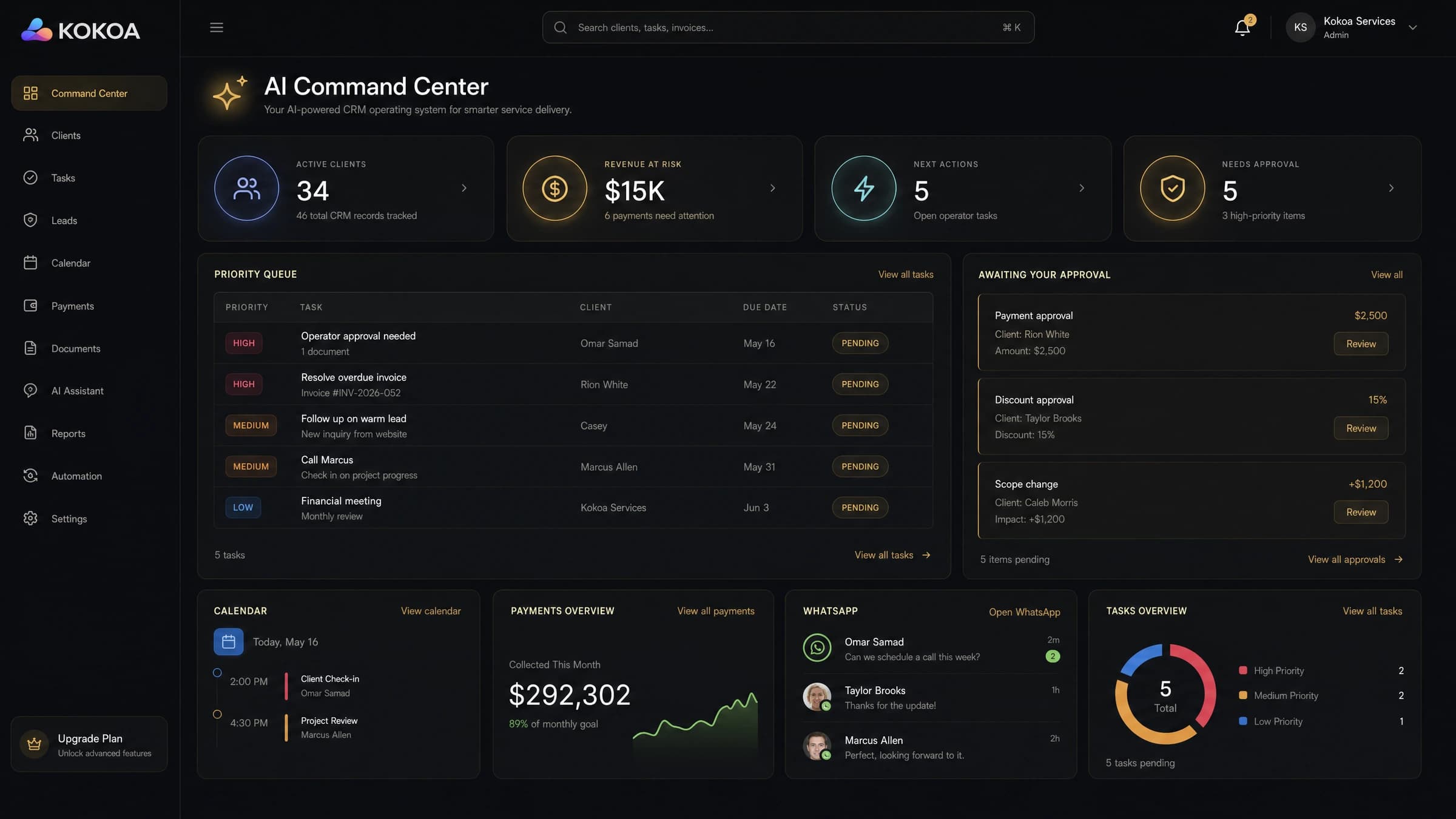
Live product surfaces
Version 01 · Kokoa system concept
Product direction

S1 · Surface
A finance-aware command view that keeps revenue, receivables, hot leads, and calls in the same operating loop.

S2 · Surface
The daily brief turns CRM, payment, email, and task signals into the few decisions that should move today.

S3 · Surface
A clean pipeline surface where lead stage, owner, follow-up, and value stay visible from first touch to onboarding.

S4 · Surface
Scheduling is treated as relationship context, with calls, onboarding, follow-ups, and synced calendars in one place.

S5 · Surface
Coverage views show where the team has CRM records, where gaps remain, and which accounts need attention next.

S6 · Surface
Operator accountability stays visible through rep activity, overdue work, task pressure, approvals, and daily follow-up lists.
Version 02 · Client implementation
The same Kokoa logic is adapted to a working CRM for sports representation: executive decisions, sales movement, recruiting intelligence, client onboarding, calendars, and AI-assisted action in one connected environment.

V01 · Client surface
An executive cockpit turns client volume, MRR, pipeline value, receivables, collections, and priorities into one operating view.

V02 · Client surface
The daily decision layer ranks collections, follow-ups, overdue accounts, and the five actions that matter most right now.

V03 · Client surface
Rep accountability, channel-specific demand, proposals, and pipeline value are organized into a single action queue.

V04 · Client surface
Hot leads, ownership, last touch, follow-up risk, and monthly retainer value stay visible across the active book.

V05 · Client surface
The client book connects service type, fees, owners, upcoming follow-ups, open tasks, balances, and account status.

V06 · Client surface
Client setup becomes a visible checklist across agreements, entity formation, banking, accounting, credit, and insurance.

V07 · Client surface
Conference and team coverage reveal signed clients, open leads, follow-ups, tasks, and scouting gaps across the recruiting market.

V08 · Client surface
A multi-account calendar keeps calls, meetings, and rep schedules visible alongside the CRM operating rhythm.

V09 · Client surface
The CRM-native assistant can search records, book meetings, move stages, surface collections, and create accountable tasks.
A business can connect its website intake and ongoing client records into the same operating surface.
Client conversations become actionable CRM signals instead of getting buried in separate inboxes.
Important outreach, calls, and follow-ups can be tracked against the record they belong to.
MRR, manual payments, failed payments, receivables, and collections sit beside the client journey.
Discovery calls, CEO calls, onboarding meetings, and internal tasks become part of the workflow.
The assistant scans CRM, payments, accounting, calendar, and email surfaces to prepare the day.
Financial changes, sensitive messages, and escalations are routed to approval before action.
Team performance, task pressure, overdue work, and ownership are visible in one command layer.
Design decisions
The home view is not a generic dashboard. It is a working surface that tells the operator what changed and what needs attention.
AI prepares summaries, drafts, and recommended actions, but the interface still makes risk and approval visible.
Payments and receivables are part of client operations, so they appear next to the CRM rather than in a separate finance silo.
Meetings, calls, onboarding, and follow-ups are linked to records so scheduling becomes part of the relationship history.
“A strong AI operating system should feel less like a chatbot and more like a disciplined chief of staff: it sees the work, prepares the decision, and keeps humans in control.”
Before and after
Before
After
Relevance to complex product design
Kokoa is more than a CRM dashboard case study. It is a complex AI product experience designed around client intake, CRM movement, WhatsApp and email context, payment visibility, calendar workflow, and operator approval. The same design principles apply to any product where teams need automation, trust, and clarity before taking action.
This type of workflow thinking is relevant for products that rely on

N° 01
CRM AI Operating System
Reflection
The biggest lesson from Kokoa is that AI product design has to be both ambitious and restrained. The system should make work feel faster and clearer, but it also has to preserve trust, approval, context, and accountability when client relationships or money are involved.
Operators need to see what the system recommends, what it is allowed to do, and where a human must approve the next step.
A strong operating dashboard does not just store records. It turns business movement into decisions the team can trust.
CRM, payments, calendar, messages, calls, and tasks become more valuable when they support one clear workflow.
Designed for accountable AI operations
Kokoa represents the kind of product work I enjoy most: premium SaaS interfaces, AI workflow design, CRM systems, payment-aware operations, and digital experiences that turn messy service businesses into clear user journeys.