Tellbyte

Introducing Orbyte, a full platform built to help businesses scale and launch custom AI automations.

TellByte

Enterprise Product Design Case Study

Chick-fil-A Headquarters Security Operations Dashboard

Centralizing cameras, access control, network diagnostics, and audit intelligence into one operational command center.

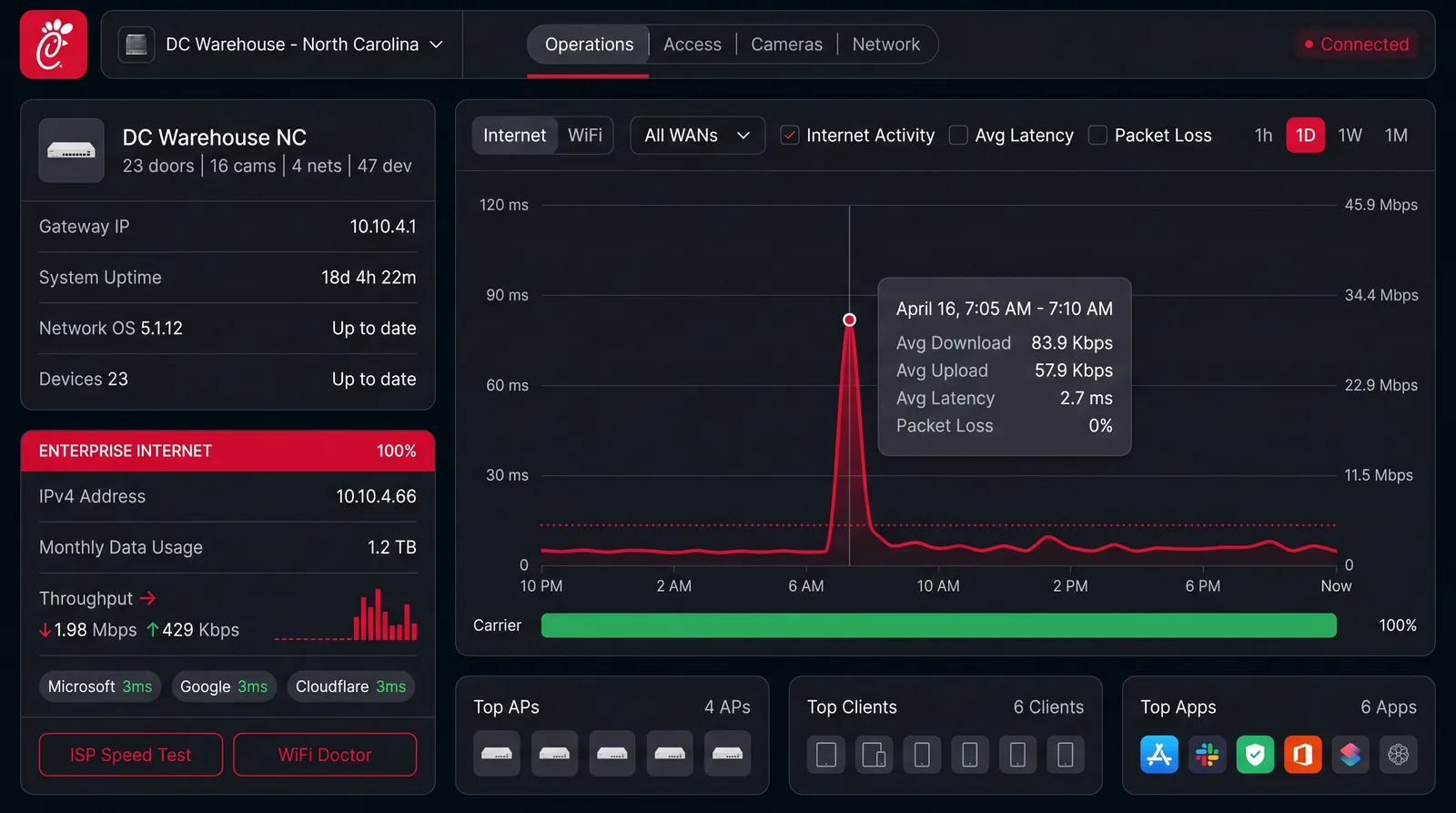
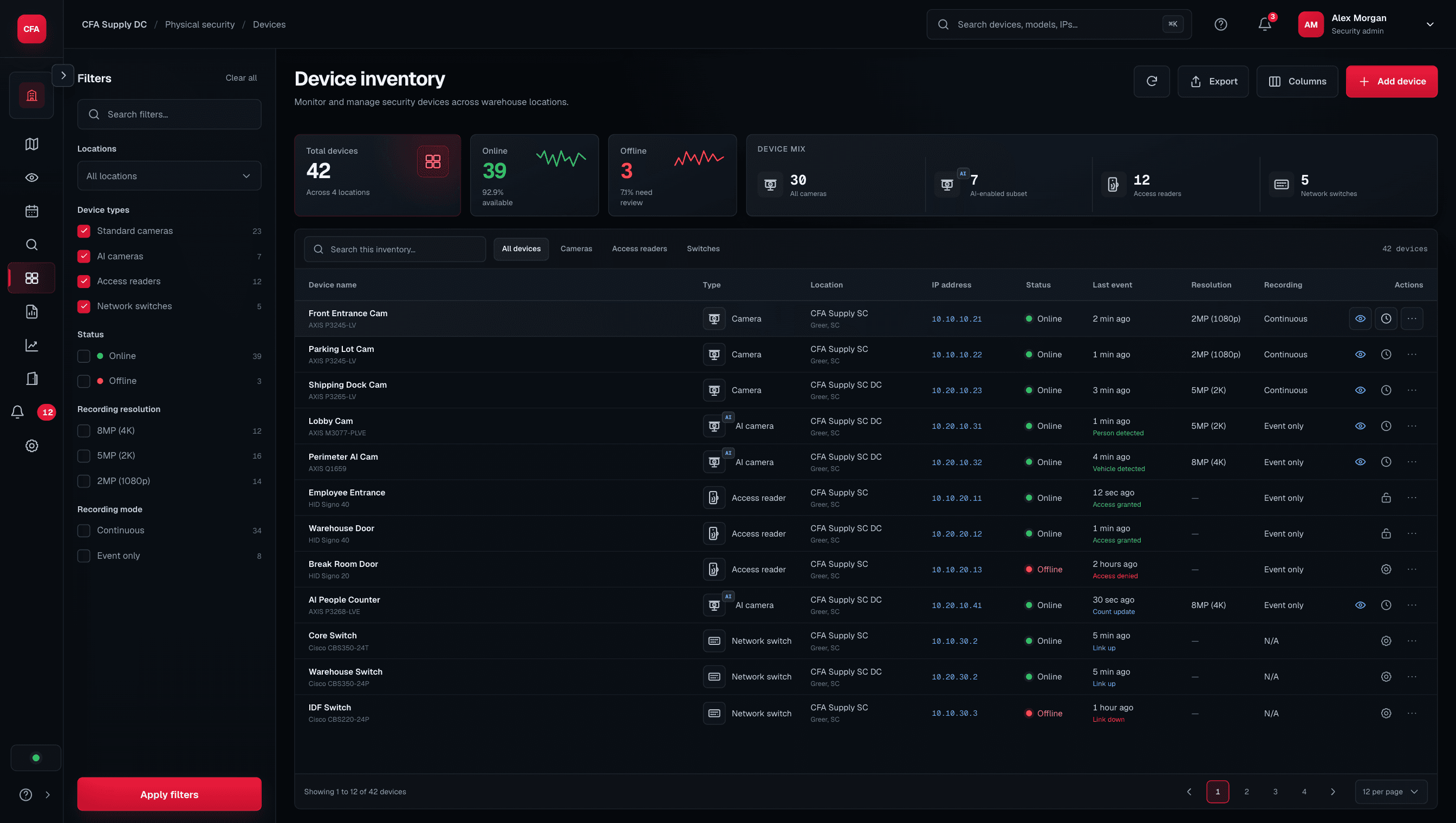
A custom dashboard designed to help security, IT, and access control teams monitor door events, camera health, network status, IP assignments, route traces, switch conditions, and audit logs from one organized interface.

Role

Product Designer / Systems Builder

Focus

Enterprise dashboard UX, security operations, monitoring, audit workflows

Platform

Custom web dashboard

Systems

Cameras, access control, cloud APIs, SQL data, network monitoring

Status

Enterprise operational dashboard

Chick-fil-A enterprise security operations cover - red brand panel with the Chick-fil-A logo and a row of security operations icons (camera, network signal, access, biometrics, lock, screen, gauge, shield)

Enterprise Security

tellbyte

× Chick-fil-A

Why this project matters

From scattered security systems to one operational view.

Large enterprise campuses often rely on several disconnected systems to manage security operations. Cameras, access control, door events, network devices, IP assignments, logs, and audit reports can live in separate tools. This dashboard was designed to bring those operational signals into one organized interface so teams could monitor, investigate, and act with more clarity.

01

The Visibility Problem

Security teams need to understand what is happening across doors, cameras, switches, and networked devices without jumping between disconnected systems.

02

The Response Problem

When a door event, camera issue, forced entry alert, or network failure occurs, teams need context quickly so they can decide what action to take.

03

The Audit Problem

Enterprise environments need clean logs, searchable history, event trails, and exportable records for investigation and compliance workflows.

User and use case

Designed for security, IT, and access control operations.

Primary Users

Security operations teamsAccess control administratorsIT and network teamsLow-voltage / security techniciansFacility operations teamsSystem administratorsAudit and compliance stakeholders

User goal

Monitor access control and camera infrastructure, diagnose operational issues, review security events, verify system health, and export clean records for investigation.

Pain Points

  • Too many separate systems
  • Difficult to trace events across cameras, doors, switches, and logs
  • Door status and camera status are not always easy to compare together
  • IP address changes can create device confusion
  • Forced entry, access denied, and unlock events need clear review paths
  • Audit logs can become difficult to search and export
  • Operators need confidence before taking high-risk actions

Design principle

The interface should make operational status visible, preserve context during investigation, and make high-impact actions clear, controlled, and auditable.

The core workflow

The product workflow.

01

Monitor Campus Health

Users see a high-level view of door status, camera status, switch health, network alerts, and active events.

02

Detect Event or Issue

The system surfaces door events, forced entry alerts, access denied logs, camera offline status, or network/device issues.

03

Inspect Context

The user opens a focused detail view with related camera, door, device, user, timestamp, network, and event history context.

04

Diagnose System Path

The dashboard supports IP tracking, route tracing, switch status review, and device connectivity checks.

05

Take Controlled Action

Authorized users can verify lock/unlock status, review trigger/open functions, and perform controlled operational actions when permitted.

06

Audit and Export

The user can search, filter, organize, and export logs or event trails for reporting, investigation, or compliance.

The workflow was designed to help operators move from signal to context to action without losing visibility across the larger security environment.

UX challenge

The challenge was not only monitoring. It was operational confidence.

Problem statement

Security and access control systems generate a high volume of events, device statuses, logs, and network signals. When these signals are scattered across separate tools, operators lose time and confidence trying to understand what happened, where it happened, and what needs to be done.

Design goal

Create one dashboard that helps users answer:

  • Which doors need attention?
  • Which cameras are online or offline?
  • Which access events matter right now?
  • Which network or IP issue may be causing the failure?
  • What actions are available to the operator?
  • What evidence or audit trail needs to be exported?

“High-trust dashboards should not only show system data. They should help operators understand the situation, verify context, and act with confidence.”

Wireframe story

Wireframing the operational command center.

Drag through the five wireframe frames that defined the operational flow: overview → doors → cameras → network → audit.

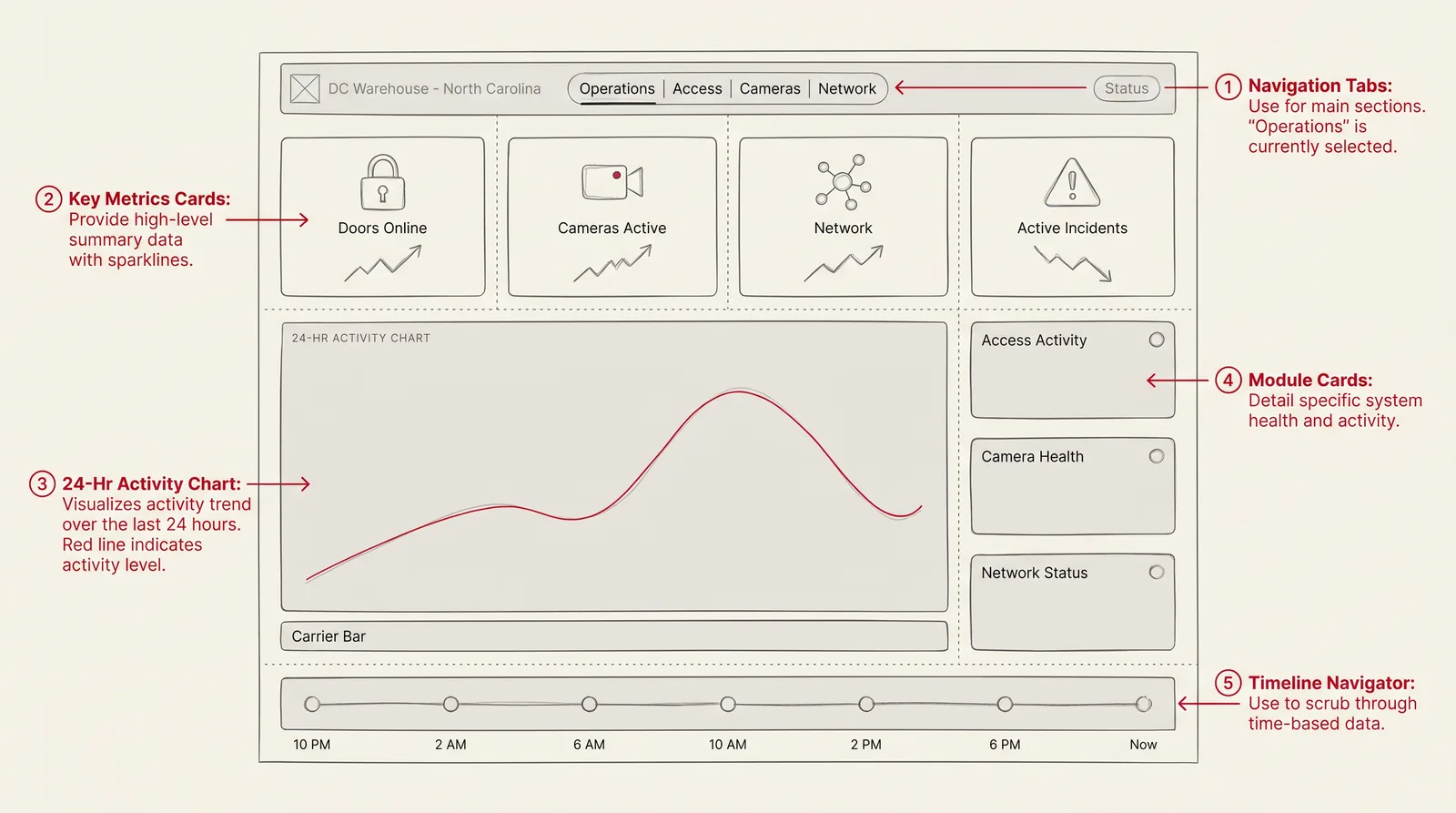
F1
Command center overview wireframe sketch - DC Warehouse North Carolina dashboard with door/camera/network stat tiles, 24-hour activity chart, module health column, and event timeline

F1 · Frame

Command Center Overview

A high-level operations screen showing door status, camera health, alerts, switch status, and active incidents.

F2
Door access monitoring wireframe sketch - DC Warehouse access control grid with 8 gate cards across NC, SC, TN, and Chattanooga, status pills, and unlock activity feed

F2 · Frame

Door Access Monitoring

A door-focused view for lock state, forced entry events, access denied logs, user events, and event history.

F3
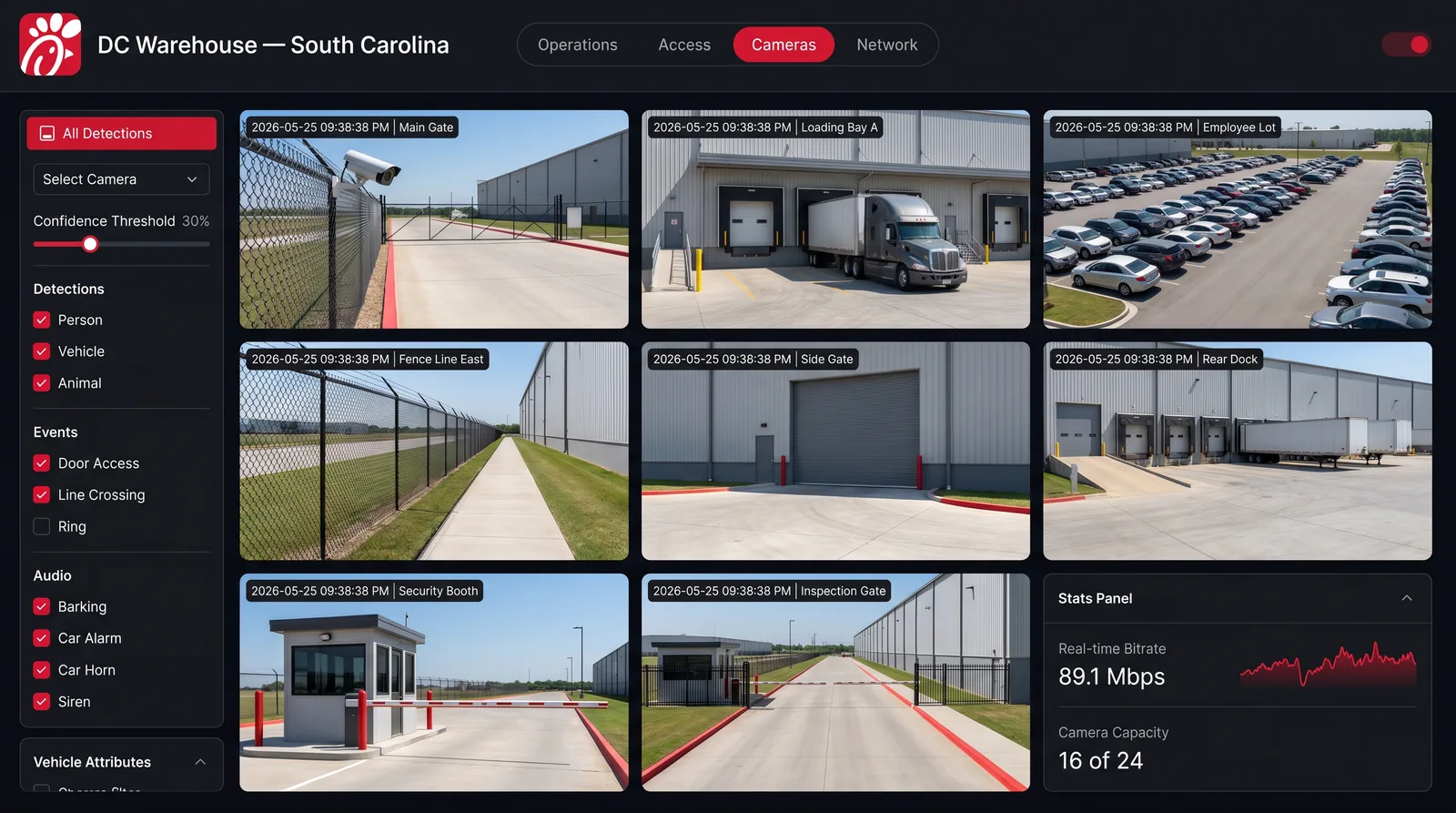
Camera and event context wireframe sketch - DC Warehouse South Carolina multi-camera grid with eight live feeds of gates and loading bays plus a detections sidebar

F3 · Frame

Camera and Event Context

A review screen connecting camera status and event details so operators can investigate issues in context.

F4
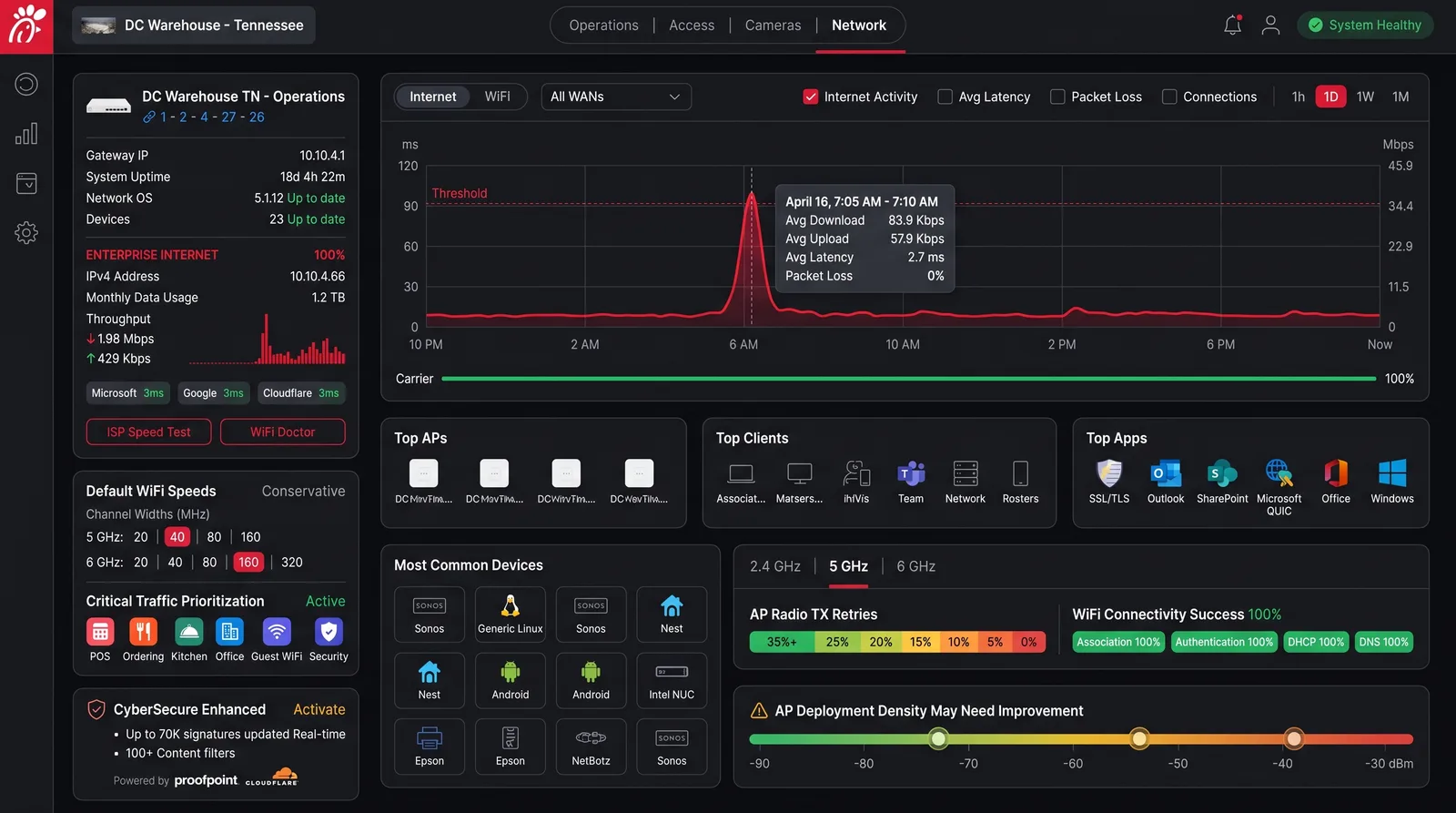
Network and IP diagnostics wireframe sketch - DC Warehouse Tennessee gateway info, 24-hour latency chart, top APs/clients/apps, device grid, and connectivity status

F4 · Frame

Network and IP Diagnostics

A diagnostic panel for IP assignment, device status, switch monitoring, route tracing, and connectivity checks.

F5
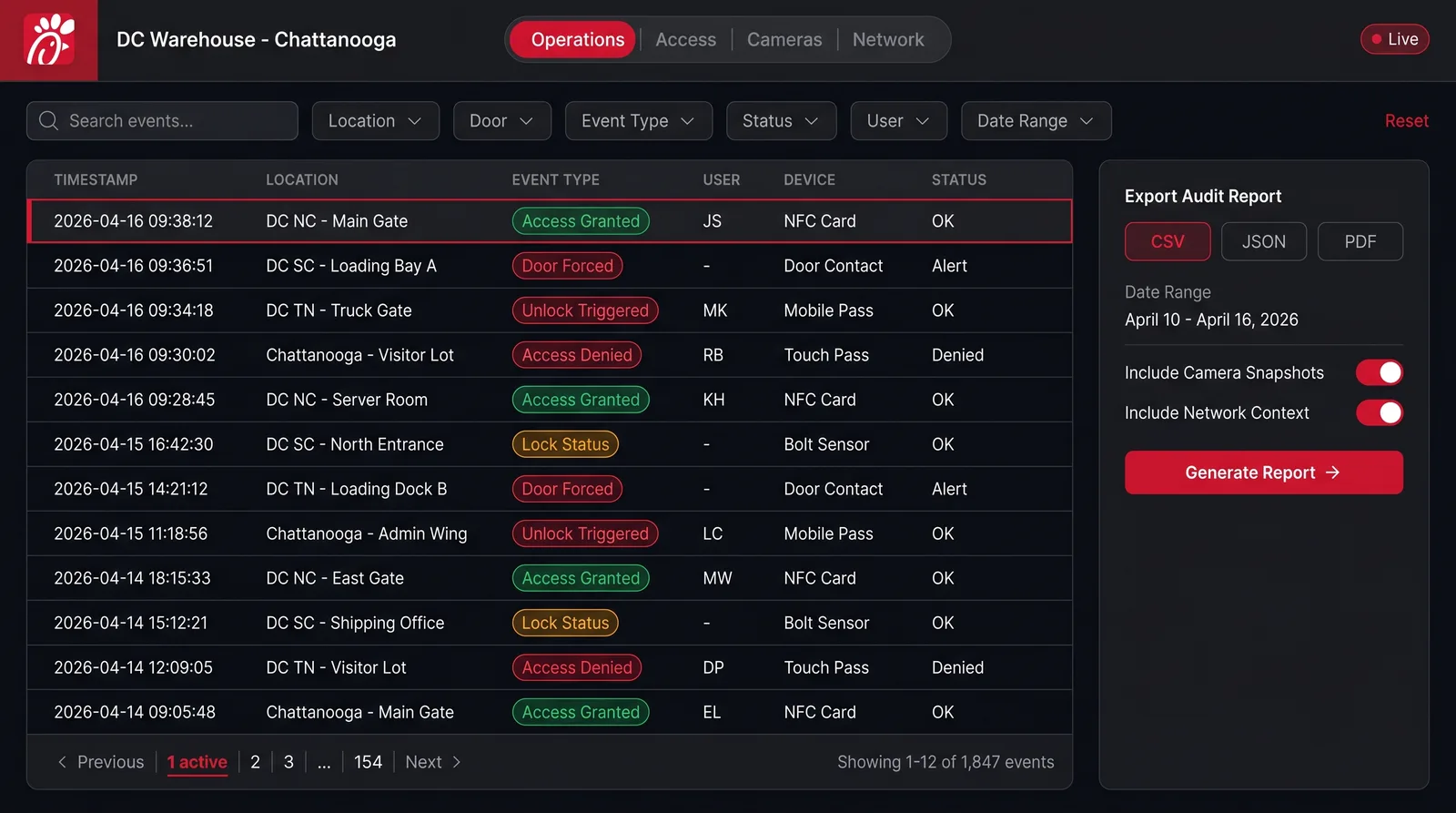
Audit and export workflow wireframe sketch - DC Warehouse Chattanooga event log table with filter pills, event type badges, and an export audit report panel

F5 · Frame

Audit and Export Workflow

A searchable log interface designed for filtering, organizing, and exporting clean event trails.

Drag or scroll5 frames

Final product experience

A dashboard built around visibility, control, and auditability.

Security operations overview - DC Warehouse North Carolina dashboard with system health stats, 24-hour activity chart, module status column, and event timeline

Module surfaces

One operational story rendered across the three primary surfaces.

Each surface frames the same idea: a security signal moves from high-level health to investigation to controlled action without losing context.
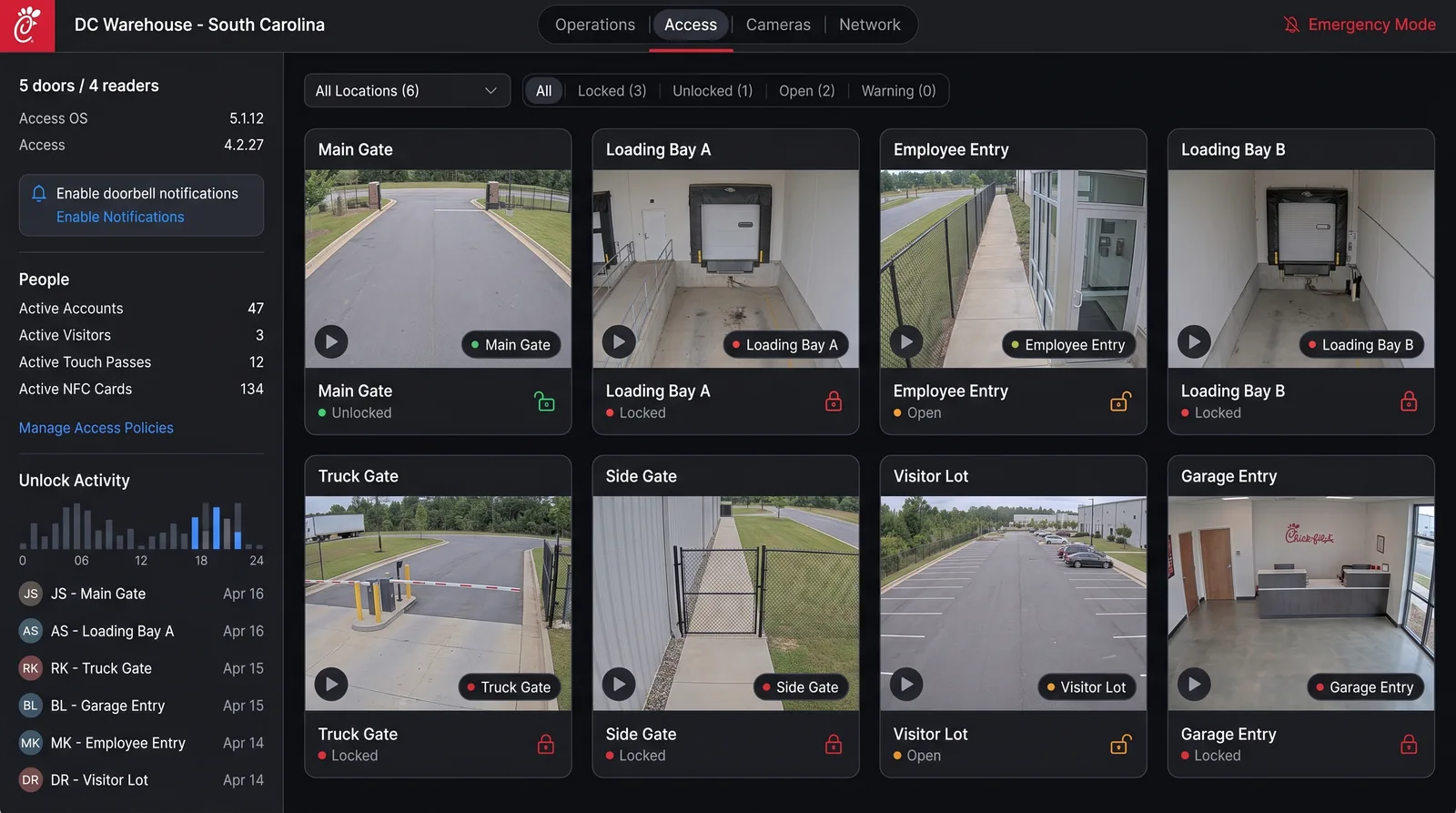
Access control surface - DC Warehouse gate grid with status badges, filter pills, and unlock activity feed

Access Control

Camera operations surface - multi-camera grid of DC Warehouse exterior gates and loading bays with detections sidebar

Camera Operations

Network diagnostics surface - gateway info, 24-hour latency chart, top APs/clients/apps, and device grid for DC Warehouse Tennessee

Network & IP Diagnostics

Unified Operations View

A centralized dashboard for viewing doors, cameras, devices, network signals, and active events in one place.

Door Access Intelligence

Operators can review lock status, access events, forced entry conditions, and historical logs with clearer context.

Camera Health Monitoring

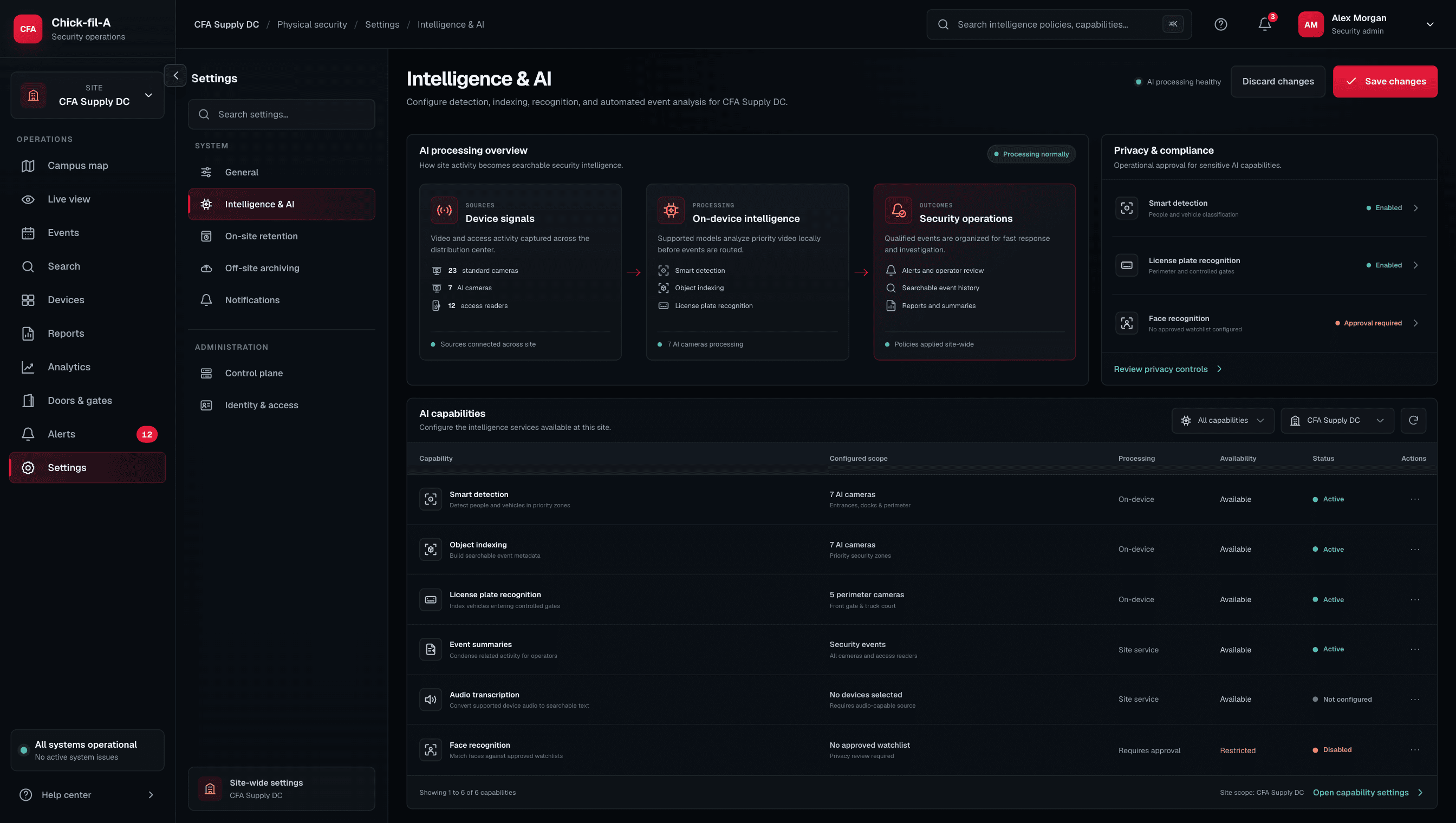
Camera visibility is connected to operational status so teams can quickly identify offline or unhealthy devices.

Network and IP Diagnostics

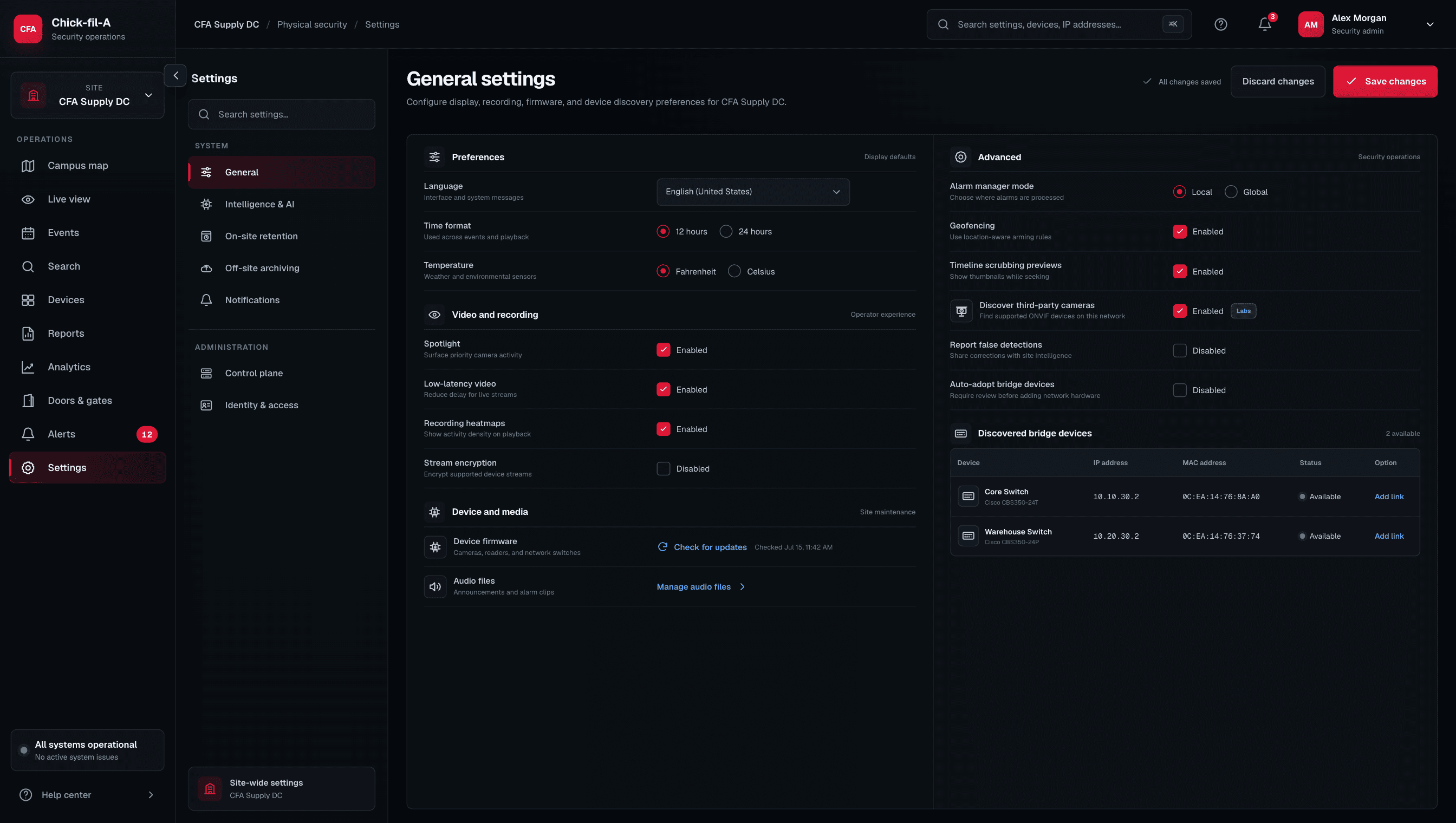
IP assignments, route tracing, switch status, and device connectivity tools help technical teams troubleshoot faster.

Event Detail Drawer

A context-preserving detail view helps users inspect incidents without losing the larger dashboard view.

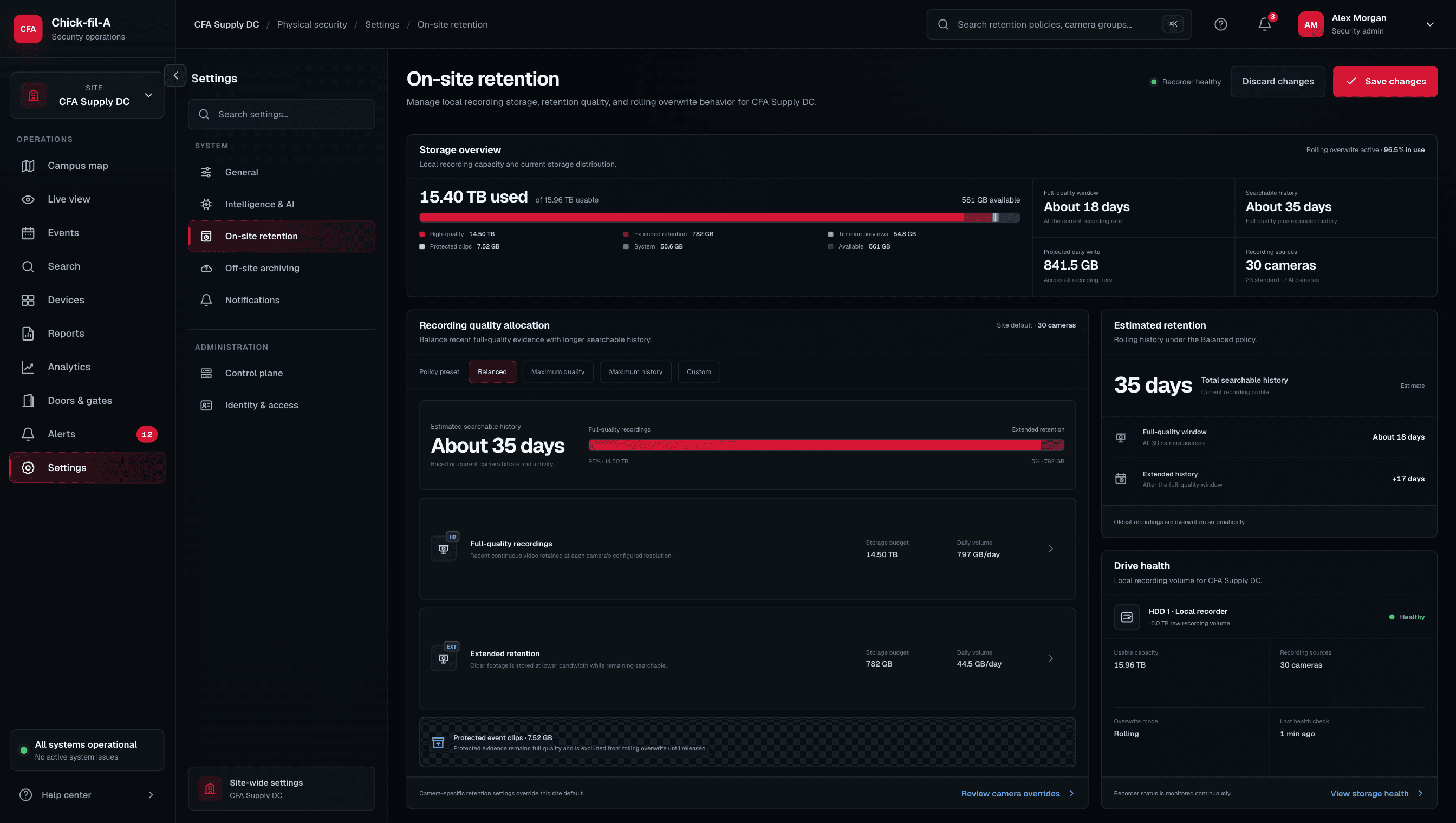
Audit-Ready Logs

Searchable, filterable, and exportable logs support investigations, reporting, and compliance workflows.

Controlled Actions

High-impact actions like trigger/open checks or lock/unlock verification require clear context, permissions, and traceable logs.

Operational System States

The UI accounts for online, offline, degraded, warning, pending, failed, and unknown system states.

Audit-ready trail

Event logs, search, and export - designed for investigation and compliance.

Audit & export workflow - searchable event log table with filter pills, event-type badges, and an export panel

Operational intelligence layer

Where automation improves the user experience.

The dashboard was designed to make operational signals easier to interpret. Instead of forcing users to manually piece together door events, camera status, network checks, and logs, the interface organizes these signals around investigation and action.

01

Event Prioritization

Important alerts like forced entry, access denied, offline cameras, and failed connectivity can be surfaced above routine system noise.

02

Context Linking

Door events, camera status, device records, switch information, and timestamps can be reviewed together to support faster investigation.

03

Audit Summaries

Logs and event trails can be organized into cleaner exportable records for review, reporting, and compliance.

Future AI opportunities

Where AI could extend the operational layer.

These directions are framed as opportunities, not claims. They reflect where AI could strengthen monitoring, investigation, and device health without replacing human judgment.

01

Anomaly Detection

AI could identify unusual access patterns, repeated failures, or abnormal door activity.

02

Natural-Language Log Search

Operators could ask questions like “show forced entry events from this week” or “find offline cameras in this zone.”

03

Incident Summaries

AI could summarize event timelines into readable investigation notes.

04

Predictive Device Health

AI could help detect patterns that suggest a camera, switch, or access control device may fail soon.

“The goal is not to automate away human judgment. The goal is to help operators see risk, context, and next steps faster.”

Design decisions

Key design decisions.

01

Summary before detail

Operators see the most important system health signals before drilling into individual doors, cameras, or devices.

02

Context-preserving drawers

Details open without forcing users to leave the main monitoring view.

03

Separate monitoring from control

Viewing system status and performing operational actions are clearly separated to reduce risk.

04

High-risk action clarity

Lock, unlock, trigger, and open-related actions require clear labeling, permissions, and audit visibility.

05

No silent failures

Offline, degraded, unknown, or failed system states are surfaced clearly instead of being hidden.

06

Logs as a first-class workflow

The dashboard treats logs and exports as core product features, not secondary admin tools.

07

Network context matters

IP, switch, route, and connectivity data are connected to device and access control troubleshooting.

08

Searchable audit trails

Users can filter event history by device, door, timestamp, status, user, location group, and event type.

Before and after

Before: disconnected tools. After: centralized operations.

Before

  • Separate camera, access control, and network tools
  • Manual device checks
  • Difficult IP tracking
  • Door events reviewed in isolation
  • Logs spread across systems
  • Slower investigation paths
  • Harder audit preparation
  • Limited shared visibility between security and IT

After

  • Unified security operations dashboard
  • Door, camera, and network context in one view
  • IP assignment and route tracing support
  • Clear event timelines
  • Searchable and exportable logs
  • Faster issue investigation
  • Better audit readiness
  • Shared operational visibility across teams

Relevance to complex enterprise products

Why this matters for high-trust product design.

This dashboard was more than a monitoring tool. It was a high-trust operational system designed to help teams understand complex infrastructure, verify events, diagnose technical problems, and act with confidence. The same product design principles apply anywhere users need to turn live data, alerts, system states, and logs into clear decisions.

This type of workflow thinking is relevant for products that rely on

Live dataAPIsDevice monitoringAccess control eventsCamera systemsNetwork diagnosticsAudit trailsHuman reviewOperational dashboardsHigh-confidence decision-making
Operational confidence cover - co-branded Chick-fil-A and TellByte editorial poster with a red icosahedron network sphere on a glossy platform emitting concentric rings

Reflection

What I would carry forward.

The biggest lesson from this project is that enterprise dashboards need more than clean visuals. They need clarity, trust, permissions, system state transparency, and auditability. When a dashboard supports security, access control, cameras, and infrastructure, every design decision should help the user understand what is happening, why it matters, and what action is safe to take.

Trust is part of the interface.

A security operations dashboard has to make users confident in what they are seeing before they act.

Context reduces response time.

Connecting doors, cameras, devices, network state, and logs helps operators investigate faster.

Auditability protects the workflow.

Every meaningful event and action should be searchable, reviewable, and exportable.

Designed for operational confidence

Designed for operational confidence.

This case study represents the type of product work I enjoy most: complex systems, live operational data, high-trust workflows, technical diagnostics, and interfaces that help teams make better decisions faster.